
How it works Connect your AI See it in action For developers FAQ Connect your AI assistant
MCP Model Context Protocol connector — live on ChatGPT, Claude & Gemini Connector for AI assistants

Connect Your AI Assistant to 7,000+ Local Tour Operators

Let ChatGPT, Claude, Gemini and other AI assistants submit travel inquiries for you — get real quotes from local operators in 24–48 hours.

No sign-up required Free to use 7,000+ operators worldwide
What it does

One inquiry.
Three steps. Real quotes.

01 / 03

Tell your AI about your trip

Chat with your AI assistant (ChatGPT, Claude, etc.) and describe your travel plans — destination, dates, travelers, budget.

02 / 03

We match you with local operators

Your AI submits the inquiry through FindTourGuide, connecting you with trusted local tour operators.

03 / 03

Get quotes in 24–48 hours

Local operators send personalized quotes directly to your email. Compare and choose the best one.

The whole flow

Turn a simple conversation with your AI assistant into a verified travel inquiry — no sign-up, no middlemen, just real quotes from local operators.

How to connect

Connect your AI assistant

MCP Server URL One URL · every MCP assistant
https://www.findtourguide.com/mcp

Example: ChatGPT

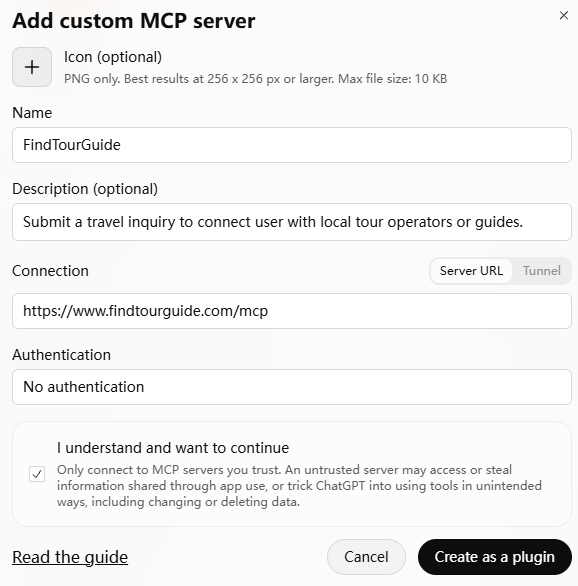
Step by step

Other assistants follow a similar process — look for “MCP”, “Tools”, or “Connectors” in your assistant's settings.

  1. 1

    Open ChatGPT settings

    Go to Plugins → Add → Add custom MCP server.

  2. 2

    Paste the MCP server URL

    Use https://www.findtourguide.com/mcp as the server address.

  3. 3

    Confirm the connection

    ChatGPT discovers the available tools automatically. You're ready to go.

  4. 4

    Start chatting

    Describe your trip in plain language. The assistant handles the rest.
Try: “I want to go on a Tanzania safari in October, 2 adults, 10 days. Can you get quotes from local operators?”
ChatGPT · Settings
Connect your AI assistant
Supported assistants
ChatGPT Claude Gemini Muse Any MCP-compatible client

You can also simply share https://www.findtourguide.com/mcp with Claude or other AI assistants and ask them to set it up for you automatically.

See it in action

From “I want to go…”
to quotes in your inbox

Here's what a typical conversation looks like when you ask your AI assistant to submit a travel inquiry through FindTourGuide — including the email receipt.

The conversation
ChatGPT Connected to FindTourGuide
MCP
I want to go on a Tanzania safari in October, 2 adults + 1 child (8 years old), 10 days. Budget around $2,000/person. Want to see the Great Migration.
ChatGPT

Great choice! Let me confirm:

DestinationTanzania DatesOctober · 10 days Travelers2 adults, 1 child (age 8) Budget~$2,000 / person InterestGreat Migration
Arrival: Kilimanjaro Airport (default) Departure: Dar es Salaam (default)

Shall I submit this inquiry?

Yes, go ahead. My name is James Wilson, email: [email protected]
ChatGPT
I need your country and to verify your email. A 4-digit code was sent to ja***[email protected] — please check.
8364
ChatGPT
Inquiry submitted

3 local operators matched. You'll receive personalized quotes in your email within 24–48 hours.

Ref FTG-2026-11842 Email verified
Verification keeps your inbox reachable for operators — no marketing emails.
What lands in your inbox
Quotes arrive as normal emails. Compare offers side by side, ask follow-up questions, and book directly with the operator you choose.
After you submit
Compare quotes side by side
Reply directly — no middleman
Book with the operator you choose
For developers & partners

Building a trip planner or AI travel agent?

FindTourGuide's MCP server lets your agent submit travel inquiries and connect with 7,000+ local tour operators worldwide. If you're building a planning tool, an AI travel agent, or any platform that needs local operator connectivity, we'd love to partner.

What kind of partnerships are we open to?
Trip planner integration — your AI plans the itinerary, FindTourGuide gets the quotes.
White-label inquiry — embed our inquiry flow directly in your platform.
Custom tools — Need more capabilities? We're open to collaboration. Write to [email protected]
Quick start

Drop this into any MCP-compatible client. Tools are discovered the moment you connect.

mcp.json
{
  "mcpServers": {
    "findtourguide": {
      "url": "https://www.findtourguide.com/mcp"
    }
  }
}
Standard MCP client config — works with any MCP-compatible runtime.
FAQ

Frequently asked questions

Everything about connecting, cost, and what happens after you submit an inquiry.

MCP server
https://www.findtourguide.com/mcp
01What is MCP?
MCP (Model Context Protocol) is an open standard that lets AI assistants like ChatGPT, Claude, and Gemini connect to external services. Think of it as a “plug” that lets your AI assistant talk to FindTourGuide directly — no copying and pasting, no switching apps.
02Which AI assistants are supported?
Any AI assistant that supports MCP can connect to FindTourGuide, including ChatGPT, Claude, Gemini, and more. If your assistant isn't listed here but supports MCP, just use the server URL: https://www.findtourguide.com/mcp.
03Do I need to pay to use this?
No. Submitting inquiries through FindTourGuide is completely free. You only pay the local operator when you decide to book a tour — and you book directly with them, with no middleman markup.
04Will operators really respond?
Yes. Our 7,000+ local operators are active on the platform and typically respond within 24–48 hours. You'll receive quotes directly in your email.
05Is my email safe?
We verify your email with a one-time code to ensure operators can reach you. We don't share your email with third parties, and you won't receive marketing emails from us.
Copied to clipboard